



When the recorder walks out the door, your footage shouldn't.
Most CCTV systems record to a single box on the wall. Steal that box and the evidence goes with it. CloudVault keeps a second, encrypted copy of your footage in the cloud, automatically and in real time, so the proof is always safe and within reach.
- Secure encryption
- Automatic backup
- Remote access
- AI detection
- Cameras
- 1–100+
- Cameras
- Resolution
- 2MP–4K
- Resolution
- Days retention
- 30–90+
- Days retention
New to this? Start here
What is cloud CCTV backup, in plain terms?
Your cameras record to a DVR or NVR: a box with a hard disk, usually sitting in an office or mounted on a wall. Right now, that box is the only place your footage lives. If anything happens to it, your recordings are gone.
CloudVault changes that. As your cameras record locally, we mirror the same footage to a secure cloud vault at the same time. Think of it as a fireproof safe for your video, kept in another building: one a thief can't carry off and a fire can't reach.
What's included
- An encrypted, off-site copy of your footage
- Real-time mirroring from your existing cameras
- Secure VPN tunnel, with no port forwarding
- Retention of 30, 60, 90 days or more
- Live and recorded viewing from anywhere
- Backup monitoring by our team
- Optional AI alerts and smart search
- Works with your current cameras and recorder
The pain points
What actually goes wrong with normal CCTV
These happen every day, everywhere, and each one leaves you with cameras but no usable footage.
Let's clear this up
Remote viewing isn't backup. Neither is a bigger hard drive.
These are the first two things most people say, and the most important to get right.
The common belief
“Hik-Connect already shows my footage on my phone. That's my cloud backup.”
Apps like Hik-Connect, Dahua's DMSS and iVMS let you see your cameras from anywhere, so it feels like the video is already in the cloud.
What's really happening
Those apps are a remote view, not a backup.
They open a window into footage that still lives on your local DVR. Nothing is copied off-site. If the DVR is stolen, smashed or its disk fails, the app shows a blank screen, because there's nothing left on the box to stream.
The common belief
“I'll just add a bigger hard drive and keep everything on site.”
A bigger disk is cheaper up front, and it feels like it solves the “we ran out of days” problem.
What's really happening
A bigger disk stores more. It protects nothing.
The same box just holds more days. It does nothing when that box is stolen, burnt or the disk itself fails, and the disk is the part most likely to fail. More footage in one place means more to lose at once.
It's the difference between a window that lets you peek into your safe from far away and a second safe kept in another building. Steal the first safe and the window shows an empty room. The second safe still holds everything. CloudVault is the second safe, and we monitor it, so you're not trusting a disk you'll forget about until the day it dies.
How it works
No magic, and nothing ripped out
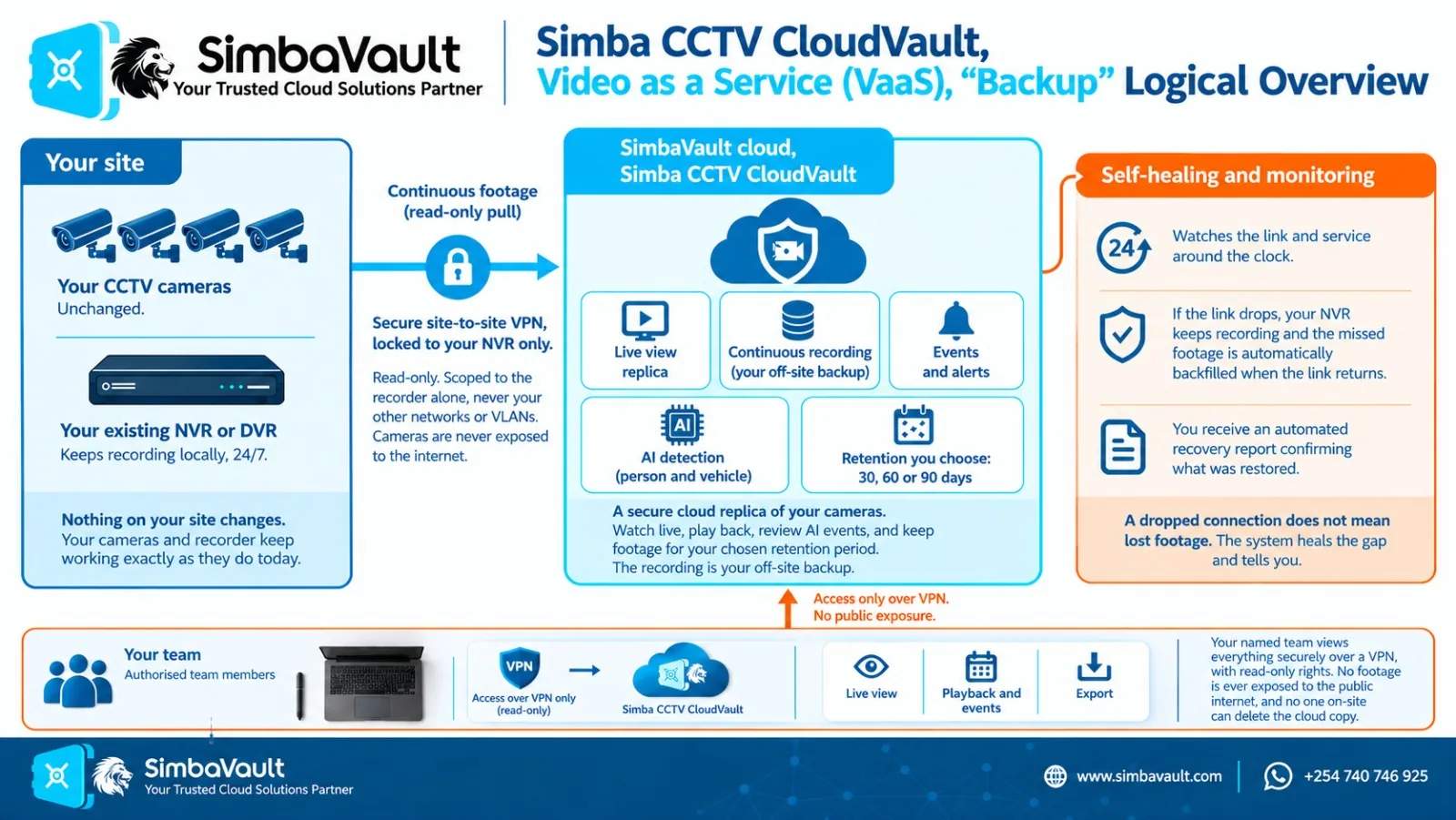
You keep your cameras, your recorder and your local recording exactly as they are. CloudVault runs quietly alongside them.
- 01
A secure private tunnel
We connect to your system over an encrypted VPN tunnel. Your cameras are never exposed to the open internet, which is safer than the port forwarding most DVRs rely on.
- 02
Dual streaming, in real time
The same video feed going to your recorder is mirrored to our cloud as it happens. Your local recording is never touched or slowed down.
- 03
Two layers of protection
A live layer for real-time viewing and AI, plus an evidence layer that keeps a continuous, recording-grade copy of the actual footage, codec for codec.
- 04
Encrypted, with your retention
In the cloud, footage is encrypted and kept for the period you choose (30, 60, 90 days or more), completely independent of your local disk.
Your cameras
IP or analog, 2MP to 4K
On-site DVR / NVR
Records locally, as usual
Simba CloudVault
Encrypted off-site copy
- Live layer: viewing and AI
- Evidence layer: recording-grade copy
- Kept 30, 60, 90+ days
Getting set up
- 1
Assess
We look at your cameras, recorder and internet line.
- 2
Connect
We set up the encrypted link. No new hardware, no downtime.
- 3
Mirror and verify
Footage starts flowing and we confirm every camera is backing up.
- 4
Access
View live and recorded footage from anywhere, with AI alerts if you want them.
- 5
We keep watch
We monitor that the backup keeps running, so you don't have to.
All it needs on your side is a working internet connection. We size the setup to the bandwidth you have, and we can prioritise your most important cameras first.
Optional AI layer
It doesn't just store footage. It watches it for you.
An optional AI layer runs on your streams, so you're alerted to what matters instead of scrubbing through hours of video.
Will it work with my cameras?
If it's a modern CCTV system, it very likely works
What CloudVault works with
- IP cameras and NVRs: the current standard. Any ONVIF-compatible system.
- Analog cameras on a DVR or XVR that can output a stream, older setups included.
- 2MP up to 4K, on H.264 or H.265. The backup is codec-agnostic.
- From 1 camera to 100+: a single shop or a whole plant.
Brands we support
- Hikvision
- Dahua
- Uniview
- Axis
- Bosch
- Reolink
- Ezviz
- TP-Link VIGI
- & more
We confirm your exact model during the assessment.
Not sure what you have?
Send us a photo of your recorder and a rough camera count. We'll tell you straight away whether CloudVault fits, and roughly what it would take to set up.
Send a photo on WhatsAppPrefer a form? Send your details hereWhy it's worth it
What you're really buying is peace of mind
Evidence you can actually use
Footage held off-site is still there when the local recorder is gone or wiped.
No single point of failure
Theft, fire or a dead disk no longer means losing everything at once.
Proof for insurance and disputes
A recoverable, time-stamped copy to back a claim or settle an argument.
Every branch on one screen
Watch multiple sites from anywhere, without travelling to each one.
Out of reach of tampering
Staff can't quietly delete the cloud copy the way they can wipe a local box.
No rip-and-replace cost
Keep your current cameras and recorder. CloudVault adds protection on top.
Who it's for
- Warehouses and godowns
- Factories and plants
- Retail and shops
- Offices
- Schools and institutions
- Estates and homes
- Multi-branch businesses
Your CCTV, secured in the cloud.
Whether it's four cameras at a shop or a hundred across a plant, CloudVault gives every one of them a backup that can't be stolen, smashed or quietly wiped.
Get a quote
See what CloudVault would protect
Tell us your cameras and how long to keep footage. You'll see how much protected footage you'd have off-site, then send it to us and we'll tailor a quote to your site.
Your setup
- 4 cameras
- 60 days
- Cloud Backup
≈ 274 GB
protected footage, off-site for 60 days
About 5 GB added every day, encrypted
- 4 × 2MP
- 274 GB
- Encrypted off-site copy of every camera
- Secure VPN tunnel, with no ports exposed
- Live and recorded viewing from anywhere
- Automatic backup monitoring and alerts
- Tamper-proof: it can't be wiped on site
- Managed support and SLA
We price every site individually. Send us your setup and we'll come back with a quote that fits.
Storage figures are estimates from real deployments and depend on how busy each camera is. We confirm everything on a quick site check, with no obligation.
FAQ
Cloud CCTV backup questions
How much does CCTV CloudVault cost?
It depends on how many cameras you back up and at what resolution, whether you choose Cloud Backup or Full HD, how long you want footage kept, and whether you add AI detection. Use the quote builder on this page and we'll send you a quote for your exact setup, with no obligation.
What's the difference between Cloud Backup and Full HD?
Cloud Backup keeps a light off-site copy of every camera and is the best value. Full HD keeps the full-resolution picture, sharp enough to make out faces and number plates. Full HD stores several times more footage, so we'll help you decide which suits your site.
Is viewing my cameras on Hik-Connect or DMSS the same as a backup?
No. Remote-view apps like Hik-Connect, Dahua's DMSS and iVMS show footage that still lives on your DVR or NVR. If that recorder is stolen or its disk fails, there is nothing left to view. CloudVault keeps a separate, off-site copy.
Do I need to replace my cameras or recorder?
No. CloudVault runs alongside the cameras and DVR/NVR you already have, and your local recording carries on exactly as before. We confirm compatibility during the assessment.
Which CCTV brands does CloudVault work with?
Most modern systems, including Hikvision, Dahua, Uniview, Axis, Bosch, Reolink, Ezviz and TP-Link VIGI. IP cameras on any ONVIF-compatible system work, as do analog cameras on a DVR or XVR that can output a stream. We confirm your exact model before you commit.
Will CloudVault slow down my local recording?
No. The same feed going to your recorder is mirrored to the cloud as it happens. Your local recording is never touched or slowed down.
What internet connection do I need?
A working internet connection at the site. We size the setup to the bandwidth you have and can prioritise your most important cameras first.
How long is footage kept?
You choose the retention period: 30, 60, 90 days or more. It is completely independent of how much your local disk can hold.
What happens if my recorder is stolen or the power goes off?
If the recorder is stolen or destroyed, the off-site copy is still in CloudVault. If the power or internet drops, anything your recorder captured during the interruption is recovered once the connection returns. Footage your equipment never recorded can't be recovered, and we'll tell you about it plainly.
Do I need an AI-capable recorder for smart alerts?
No. The optional AI runs in our cloud, so it can recognise people, cars and trucks on the recorder you already have.
Can I see all my branches in one place?
Yes. CloudVault is built for multi-branch businesses, so you can watch every site from anywhere without travelling to each one.
Who can see our footage?
Only the people you authorise. Access is controlled per user, and footage is encrypted both on its way to the cloud and in storage.
Further reading: What we learned backing up CCTV through a real blackout
Explore other services
Web Hosting
NVMe hosting with cPanel and free SSL.
Learn more →
Business Email
Secure email on your own domain.
Learn more →
Virtual Private Servers
Guaranteed resources, full root access.
Learn more →
Backup
Every version of every file, every day.
Learn more →
Disaster Recovery
A standby site and a rehearsed way to get there.
Learn more →
Managed Services
24/7 monitoring, NOC and SOC.
Learn more →
Let's protect your footage
Tell us how many cameras you have and where they are, and we'll show you exactly how CloudVault fits your setup, with no obligation.
Call / WhatsApp
+254 740 746 925Sales
sales@simbavault.comSupport
support@simbavault.com